
Telegram users can permanently delete their accounts and cloud-stored data using the official web portal or mobile app settings on Android and iPhone devices.
The instant messaging platform permanently erases all chat history, contacts, and media files upon account deletion, with no recovery options available once final confirmation is completed.
According to Tecnoblog, the fastest method to remove a profile is through Telegram's dedicated deactivation portal accessed via a web browser on a desktop computer or smartphone.
To deactivate an account using a browser, users must visit the official Telegram deactivation portal and enter the phone number linked to the account in international format before clicking Next. A confirmation code is then delivered directly within the Telegram application, which must be entered on the webpage to proceed. After selecting the Delete account option, users have the option to enter a reason for leaving before clicking Delete My Account to confirm the permanent removal of the profile and its history.
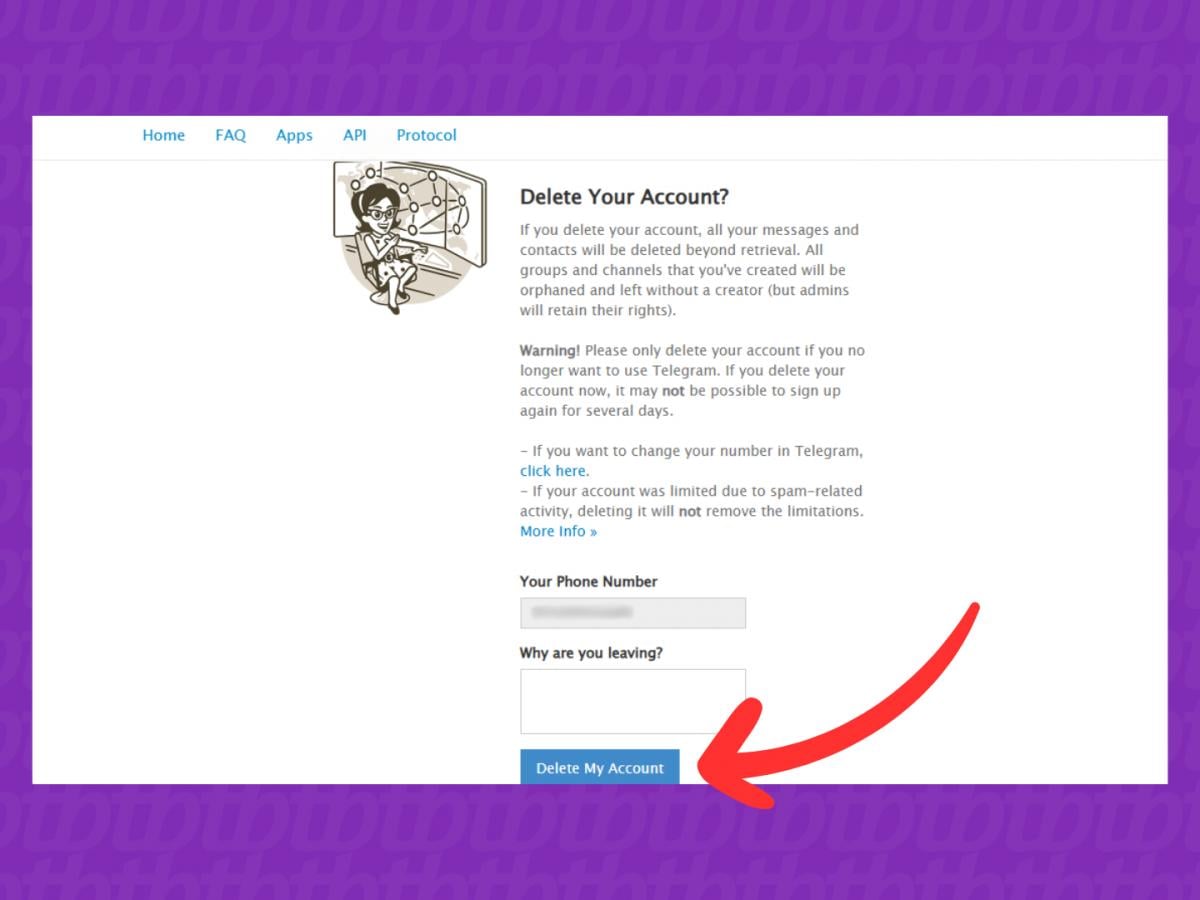
Browser account deactivation options
Web browser deactivation functions across modern desktop and mobile browsing platforms, including Google Chrome, Mozilla Firefox, Apple Safari, and Microsoft Edge. Because Telegram relies on cloud synchronization to store messages, media attachments, and user contacts across multiple devices, executing the browser deactivation process sends an immediate command to Telegram servers to purge all account data completely.
On mobile devices running the Android operating system, Telegram relies on an automated deletion timer that triggers after a specified period of user inactivity. To set up this mechanism, users open the Telegram application, enter Settings, and select Privacy and Security.
Within the Privacy and Security menu, users navigate to the Delete my account section and tap If away for. Android users can choose an inactivity timeframe ranging from 1 month to 12 months, after which the system will automatically remove the profile. Once the timer is established, users must refrain from opening Telegram, as logging into the application resets the inactivity countdown. If the period expires without user activity, Telegram automatically deletes the account alongside all cloud-stored messages and contact entries.
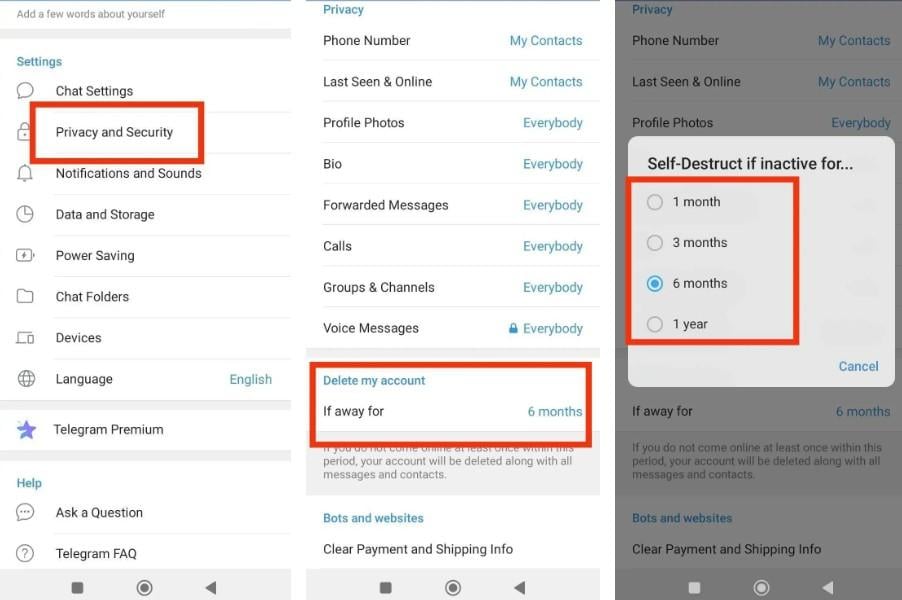
Android and iPhone mobile settings
Mobile operating systems handle user privacy and application data through specialized settings menus designed to manage background activity and cloud security. On Android, developed by Google, account management relies on periodic activity monitoring to maintain user privacy on dormant accounts.
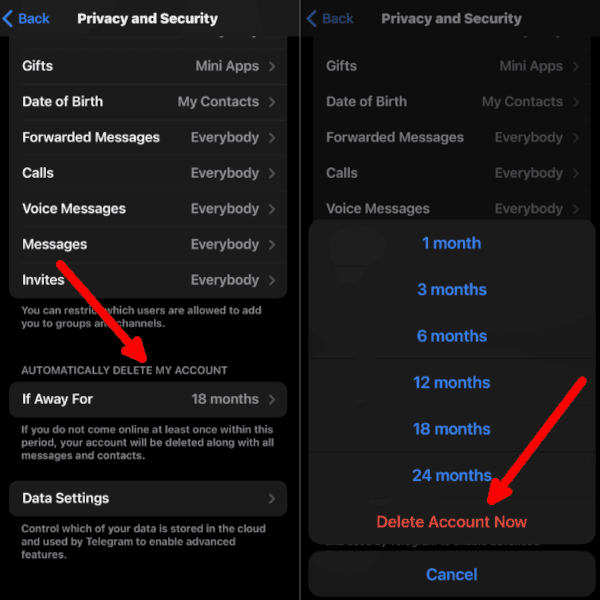
On Apple iPhone devices running iOS, Telegram offers both scheduled inactivity removal and immediate account deletion directly within the mobile application settings. Users navigate to Settings and select Privacy and Security to access the automatic deletion options under the If away for section.
iPhone owners can configure an inactivity timeframe ranging from 1 month to 24 months, or select the Delete account now option for instant removal. Users who choose to delete their account immediately can proceed through the displayed on-screen instructions to complete the process without waiting for an inactivity window to pass.
Account recovery and data retention
Account deletion in Telegram is entirely irreversible once the final confirmation step is completed, as all profile details are permanently expunged from the platform's central servers. Telegram provides no official recovery tools, and third-party services are equally incapable of restoring deleted chat logs, shared media, or contact lists.
If an account is removed automatically due to prolonged inactivity, the owner is permitted to register a new Telegram account using the same phone number. However, the newly created account starts entirely fresh, and none of the previously erased chats or personal data can ever be restored.