Smart TV manufacturers Samsung, LG, Roku, Amazon, Sony, and Vizio use built-in content tracking software by default, according to tech outlet PCMag.
The feature, known as Automatic Content Recognition, identifies whatever is playing on the television screen and transmits that data directly to device makers or advertising partners across major Smart TV platforms.
According to PCMag, television companies use the gathered information to build detailed viewer profiles, deliver targeted advertising, and generate viewing analytics. While manufacturers maintain that collected viewing data is kept confidential and securely stored, tech experts warn that the technology remains inherently intrusive.
Smart TVs are internet-connected televisions equipped with integrated operating systems, onboard applications, and interactive digital features. Automatic Content Recognition is a background technology designed to match audio and visual samples from a screen against reference databases in real time, giving television networks and advertisers insight into audience behavior.
How Automatic Content Recognition Monitors Viewers
When a user opens a streaming application such as Netflix, the application itself automatically logs what movie or show has been selected. Automatic Content Recognition operates independently of individual apps by analyzing the actual video and audio signals passing through the television display.
Because the software creates a distinct digital fingerprint from the raw signal, it can recognize programs regardless of the input source. The technology identifies content played through cable television boxes, external streaming media players, and Blu-ray disc players, meaning that connecting devices via HDMI cables does not prevent viewing surveillance.
By compiling these digital fingerprints over time, Smart TV software learns significantly more about home viewing habits than consumers realize. Manufacturers combine these logs to refine content recommendation algorithms, sell audience statistics to market researchers, and customize commercial ads shown to household viewers.
Disabling ACR Tracking on LG and Samsung Televisions
Tech experts note that Automatic Content Recognition can be turned off manually on almost all modern televisions. However, manufacturers assign different brand names to the software and frequently locate the toggle switches deep inside complex system menus.
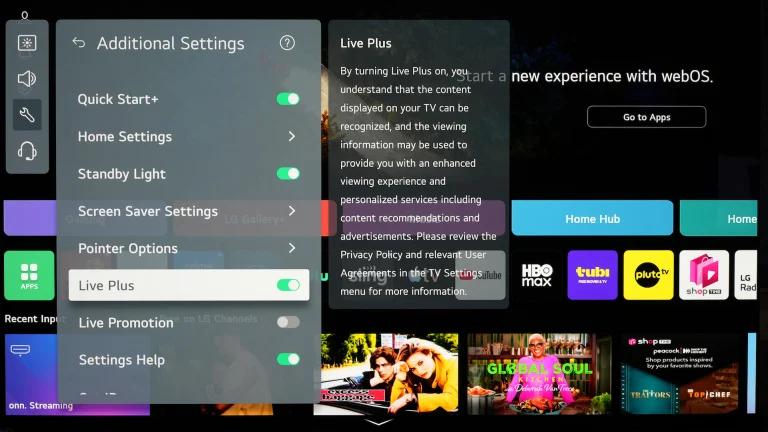
On LG televisions running webOS, the tracking technology is labeled Live Plus. LG owners can disable the feature by navigating to Settings, selecting General, opening System, choosing Additional Settings, and turning off Live Plus alongside any other options linked to viewing data collection.
For newer Samsung Smart TV models, users must open Settings, select All Settings, enter General & Privacy, and choose Terms & Privacy. From there, disabling both Viewing Information Services and Interest-Based Advertisements turns off the underlying ACR systems. On older Samsung sets, the path is located under Settings, followed by Support, then Terms & Privacy, where the same two data services can be switched off.
Settings for Roku, Amazon Fire TV, Sony, and Vizio
Owners of Roku televisions can disable monitoring by opening Settings, selecting Privacy, entering Smart TV Experience, and unchecking the option labeled Use Information for TV Inputs. On Amazon Fire TV devices, users must go to Settings, select Preferences, choose Privacy Settings, and switch off Automatic Content Recognition along with device and application usage data collection.
Sony television users can turn off the software by navigating to Settings and opening Initial Setup, where the toggle is located under Interactive TV Settings or Samba Interactive TV. On Vizio displays, pressing the menu button on the remote or entering HDTV settings allows users to access System, select Reset & Admin, choose Viewing Data, and disable data gathering.
Major television brands rely on proprietary operating software to manage user interfaces, smart hubs, and background telemetry. Systems such as Samsung's Tizen, LG's webOS, Roku OS, Amazon's Fire OS, Sony's Android and Google TV platforms, and Vizio's SmartCast ecosystem all incorporate data collection frameworks to monetize user engagement after the initial hardware sale.
Further Privacy Steps and Hardware Options
Disabling Automatic Content Recognition significantly reduces the volume of viewing history sent to advertisers, but experts emphasize that it does not turn a Smart TV into an entirely private device. Because online tracking is embedded across numerous digital platforms, viewers should also audit adjacent TV settings governing personalized ads, diagnostic logs, and general account metrics.
For users seeking maximum privacy, experts recommend restricting the television's internet connectivity altogether and relying on dedicated external devices for media playback. In addition, users looking for hardware upgrades can find affordable Samsung OLED televisions that offer performance close to flagship models, or repurpose older computer monitors featuring an HDMI port into standalone streaming displays.