An author at technology website MakeUseOf preserved 88 percent of his Android smartphone battery health after two and a half years of daily use.
The device lost only 12 percent of its original energy capacity over the 30 month period without using specialized hardware or custom battery technology.
The technology specialist explained that he previously suffered rapid battery degradation on an earlier device. That experience prompted him to overhaul his charging routines and adopt built-in power protection tools.
MakeUseOf is an international consumer technology publication that provides software tutorials and hardware reviews. The Android operating system, developed by Google, powers millions of mobile devices worldwide and includes native battery management controls across various manufacturer designs.
Battery health is measured as a percentage of the original factory energy capacity remaining in a rechargeable cell. While degradation is an inevitable physical process in rechargeable batteries, user management practices directly influence how fast capacity declines over time.
Charging limits and battery protection
The primary adjustment involved capping the maximum battery charge at 80 percent rather than filling it to 100 percent. The specialist noted that lithium-ion batteries experience greater physical strain at the upper end of their voltage range, meaning constant full charges accelerate long term wear.
Fully charging a smartphone is rarely necessary if the device retains sufficient power at the end of the day. Modern Android software allows users to restrict charging limits through the device settings menu by navigating to Battery, selecting Battery Health, and enabling Charging Optimization to set an 80 percent maximum limit.
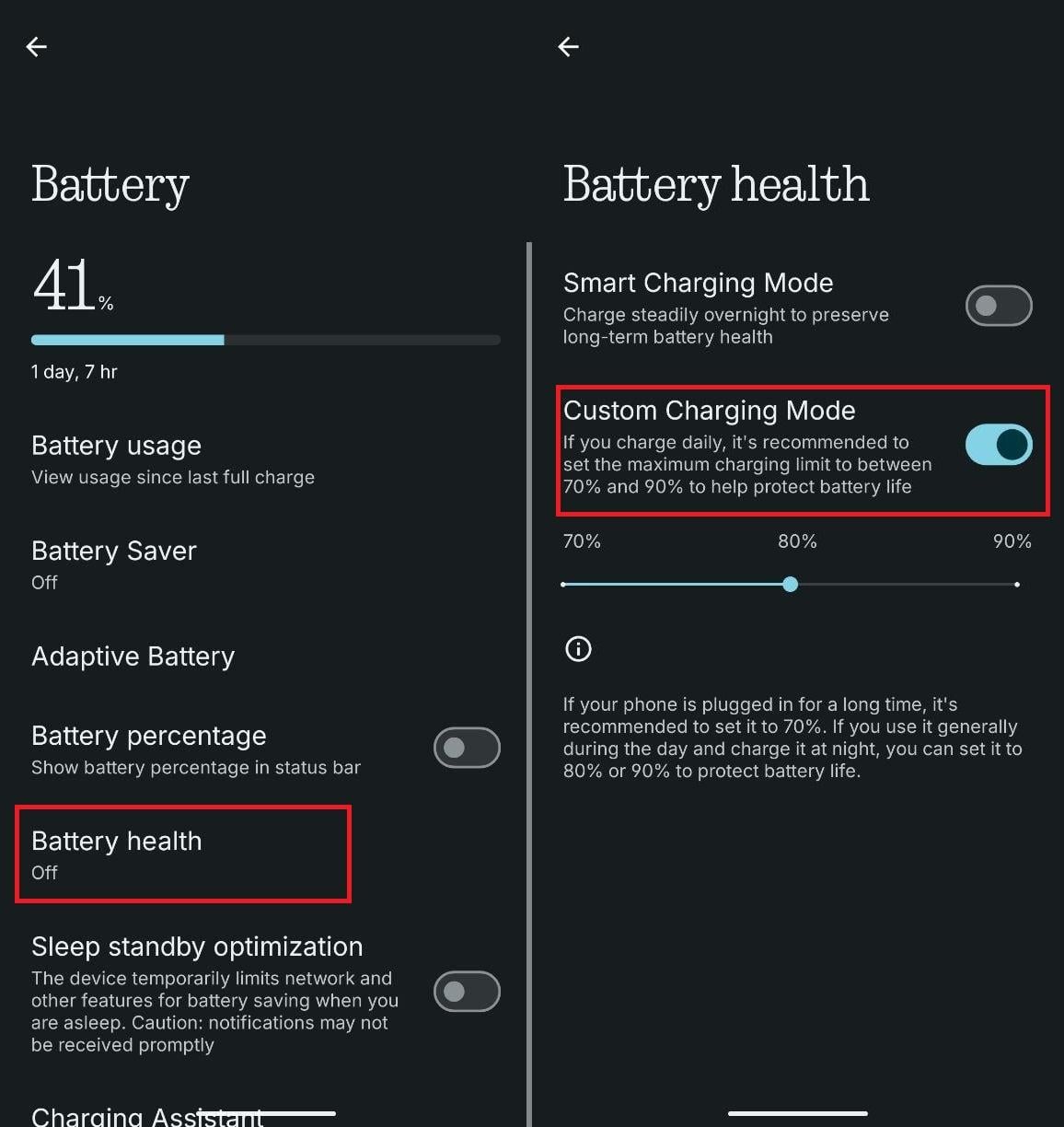
For users who find an 80 percent cap inconvenient, the author recommended enabling adaptive charging features. Adaptive charging monitors daily usage habits to delay reaching a full charge until just before the user typically disconnects the phone from power.
This automated routine prevents the smartphone from sitting fully charged at 100 percent while connected to a wall outlet for several hours overnight.
Lithium-ion batteries are standard power sources in modern consumer electronics, using chemical reactions between internal electrodes to store and release electrical energy. High voltage states during full charges create extra stress on internal chemical compounds, making active charging limits critical for long term device durability.
Temperature control and daily usage habits
Managing device temperature represents another critical step in slowing hardware degradation. Exposure to high heat speeds up internal chemical wear inside lithium-ion cells, making it essential to keep smartphones out of direct sunlight.
The technology writer advised against using a phone heavily while it is actively charging, particularly if the casing becomes warm to the touch. Users should exercise extra caution during mobile gaming or other demanding applications, allowing hot devices to cool down before resuming heavy workloads.
Daily discharging habits also impact overall battery lifespan. The author cautioned against letting the battery drop to critically low levels between three and five percent as a routine practice.
While occasionally draining a battery low will not cause immediate damage, avoiding deep discharges as a daily habit reduces stress on the cell structure. Users should connect their device to a charger earlier in the discharge cycle whenever possible.
Thermal management is critical because elevated temperatures accelerate unwanted side reactions inside lithium-ion battery cells. Mobile processors and display components generate internal heat during heavy workloads, which can compound external heat from ambient air or fast charging.
Software updates and power management
Software maintenance plays an equally vital role alongside physical care. Operating system bugs or excessive background application activity can cause processors to overheat, accelerating battery wear if left unaddressed.
System updates for Android and manufacturer user interfaces frequently deliver energy efficiency patches. These software releases optimize central processing unit activity, reducing background energy consumption and eliminating power draining errors.
Operating system updates may also introduce new power management features to older hardware. Phones that lacked built-in charging limits at launch can gain cap controls through subsequent software downloads.
Android manufacturers often apply custom user interface skins, such as Samsung One UI or Xiaomi HyperOS, over the underlying operating system. These interface layers customize menu structures and add proprietary battery health tools alongside standard Android settings.