

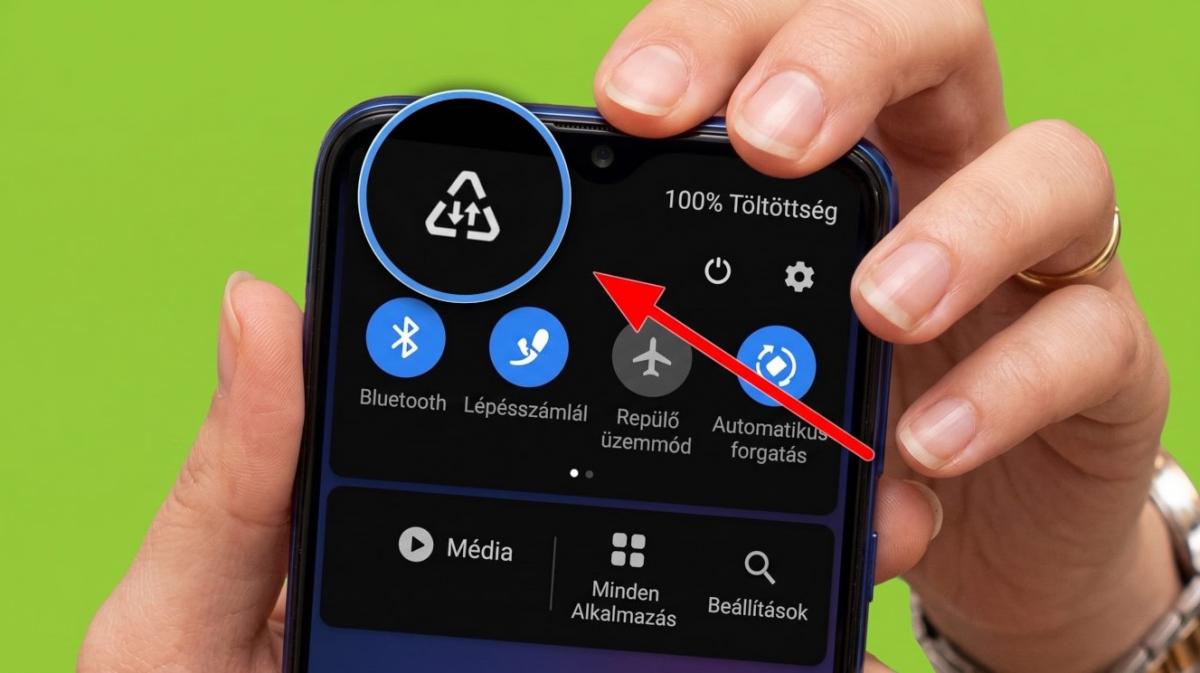
Samsung phone owners have been puzzling over a triangle icon with an upward and downward arrow that suddenly appears in the status bar, according to Hungarian outlet Blikk. The symbol is not a fault or an error message. It shows that the phone's Data Saver feature has been turned on, whether deliberately or by accident.
The status bar on modern smartphones is already crowded with icons covering battery level, signal strength and network speed, so an unfamiliar new symbol can easily cause confusion or concern. Blikk reported that many users switch the setting on without realising it, then spend days or weeks wondering why certain processes on their phone have slowed down.
What Data Saver actually does
When Data Saver is active, the phone sharply limits data transfer for apps running in the background. Social media apps stop refreshing feeds automatically, videos no longer preload, and email apps do not notify users the moment a new message arrives, Blikk reported.
Any app that does not need a constant internet connection to perform its basic functions must ask the user for permission to use data as soon as the phone connects to a mobile network.
The setting can be useful for people whose monthly mobile data allowance is close to running out, or for those travelling abroad and trying to avoid extra roaming charges, according to the report. But if the restriction is not needed, it can cause frustrating slowdowns or delayed notifications.
How to turn off the triangle icon
Switching Data Saver off removes the triangle from the status bar in a few short steps within the Samsung menu system, Blikk reported. Users should open the phone's Settings, then go to Connections, where network and data transfer options are located.
From there, they should select Data Usage, which controls mobile data transfer, then tap Data Saver Mode to see the feature's current status. Turning off the toggle switch deactivates Data Saver and makes the triangle icon disappear from the status bar immediately.
Because Samsung's One UI software has gone through several versions, the exact wording or position of these menu items can vary slightly, Blikk noted. Users who cannot locate the feature were advised to search Settings directly for the terms "data saver".
Other brands, other icons
Data-saving modes exist across other phone brands too, though they use different icons, according to the report.
- On stock Android devices, including Google Pixel, Motorola, Sony, Nokia and Asus phones, the feature appears as a plus sign inside a circle, with the circle representing the mobile data restriction and the plus symbolising extra data protection.
- On Xiaomi, Redmi and POCO phones running MIUI or Xiaomi HyperOS, the icon takes the form of a water droplet or a leaf-shaped shield. Some software updates display a small plus sign or a padlock next to the usual two-arrow mobile data icon instead.
- On OnePlus, Oppo and Realme devices running ColorOS, OxygenOS or Realme UI, the feature shows as a dotted circle containing a small data arrow or plus sign, or as a two-arrow icon accompanied by a leaf or small shield symbol.
Blikk noted that phone status bars display many other icons that appear only rarely and can be equally confusing, and that some symbols are eventually replaced by nothing more than a plain white or coloured dot. Learning what they mean is worthwhile, the outlet said, since they instantly convey useful information and make using a mobile phone less stressful.
Related advice
UNIAN previously reported that an older Android smartphone can run faster again simply by switching off one particular setting.


